Posts

Showing posts with the label Drone

Labeling Human Actions in Drone Videos

Image
In this blog we will show you how to label actions in drone videos, as shown in the video below: https://www.youtube.com/watch?v=y05iJ0vMnuI We use Microsoft VoTT as our labeling tool. The summary of labeling steps are listed as follows: ' Install Microsoft VoTT v2.1.0 ( link ) or NTUT VoTT v0.0.5 ( Windows ) Add security token to VoTT  Name : NTUTDrone Token Key : qITjd1Rj6hFqC7uB0OGxPKYVxIFSdcMrprQAMS5rEhc= Download Drone videos ( DroneVideos ) and labeling projects ( VoTT Projects ) Create two folders: C:\Drone_Target\ and C:\Drone_Source\ Put VoTT project to C:\Drone_Target\ Put drone video to C:\Drone_Source\ (Make sure ONLY project videos in this folder) Open VoTT project file ( C:\Drone_Target\Drone_001.vott ) Label and check actions ( action_lists ) ( Check Labels ) Let's see the detailed steps now. 1. Install Microsoft VoTT Download VoTT from GitHub ( https://github.com/microsoft/VoTT/releases ). Install and open VoTT 2. Add securit...
ArduPilot Software-In-The-Loop (SITL), MavLink, and AirSim

Image
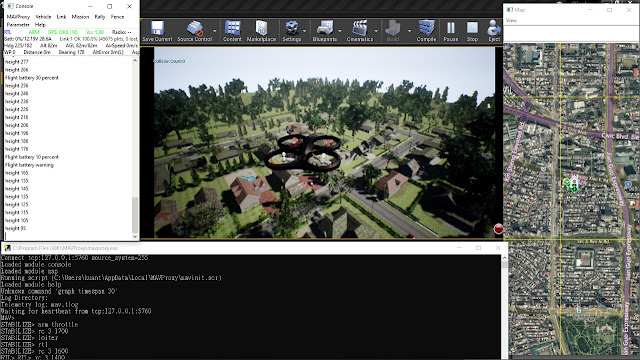
In this article, I would like to share my experience of setting up ArduPilot SITL running with AirSim using Cygwin on Windows. The result is shown in the picture below. I hope this post can be complementary to the original AirSim SITL tutorial Using SITL with AirSim . First of all, let's see the architecture of AirSim SITL: The red block represents SITL, which connects to physics simulator (blue block), which is AirSim, and a Ground Control System (GCS), which is MAVProxy in our case. So we will run three programs that communicates with each other through TCP/IP.  Now we are ready to run the simulation. The major steps are listed below: Git clone ArduPilot and build it under Cygwin. You can follow ArduPilot tutorial ( link ) or see my summary at the section ( Run SITL using Cygwin ). Install Unreal and git clone AirSim and build it, OR  download pre-built AirSim precompiled binaries ( link ) Edit “Documents\AirSim\settings.json”, note the default folder is you...